Understanding MycoQR's Data Model: From Spore to Sale
A deep dive into how MycoQR tracks cultivation data—from farm settings and strains through items, batches, yields, and invoicing. Learn how everything connects.
Understanding MycoQR's Data Model: From Spore to Sale
One question we get asked frequently is: "How does MycoQR actually track everything?" It's a fair question. Mushroom cultivation involves dozens of items moving through multiple stages, splitting into children, getting harvested across flushes, and eventually being sold. Keeping all of that connected is the core problem we set out to solve.
In this post, we'll walk through our data architecture—how your farm settings flow into individual items, how batches and production runs organize your work, and how it all connects to invoicing at the end. If you've ever wondered what happens behind the scenes when you scan a QR code or record a harvest, this is for you.
The Big Picture
Before diving into specifics, here's the mental model: MycoQR creates a connected chain from your initial setup all the way to final sale.
Every piece of data in MycoQR exists in relationship to something else. Your strain information connects to your items. Your substrate recipes connect to cost tracking. Your items connect to their parents, their batches, and eventually to the harvests they produce. This interconnectedness is what makes the analytics and traceability possible.
Layer 1: Farm Settings (Your Foundation)
Before you create your first item, you configure your farm. This configuration layer provides the building blocks everything else references.
Strains
Your strain library defines what you're growing. Each strain record includes:
- Identity: Name, culture ID (e.g., "BO-001"), strain type
- Pricing: Optional price-per-gram for yield calculations
- Growing parameters: Optimal temperature, humidity, preferred substrates, typical growth times
When you create an item, you select a strain. That connection persists through the item's entire lifecycle and follows it into yields and sales.
Substrates & Recipes
Substrates define your growing mediums—agar, liquid culture, grain, bulk substrate. But the real power comes from substrate recipes.
Each substrate can have a detailed recipe that tracks:
- Ingredients with package-based pricing (how you actually buy supplies)
- Labor, equipment, utility, and overhead costs
- Calculated yield: weight per unit, cost per unit
This is where cost tracking begins. When you create a substrate, MycoQR knows exactly what it cost to produce based on your recipe. That cost flows forward to your profitability analysis.
We designed recipes around how you actually purchase supplies. You don't buy "50 grams of gypsum"—you buy a 5kg bag for $15. Our system lets you enter the package size and price, then specify how much of that package goes into each recipe. This matches reality and makes updating costs simple when prices change.
Locations
Locations track where items physically exist—your incubation room, fruiting chamber, lab, storage area. Each location can have environmental parameters (temperature/humidity ranges) that help with monitoring.
Items track their current location, and every measurement records where it was taken. This lets you correlate outcomes with environmental conditions over time.
Layer 2: Production Runs (The Planning Level)
A production run is a high-level container that groups all cultivation efforts for a specific strain. Think of it as a "project" or "campaign."
When you start working with a new strain or begin a fresh cultivation cycle, you create a production run. Everything that follows—your agar cultures, grain spawn, substrates, and harvests—belongs to that run.
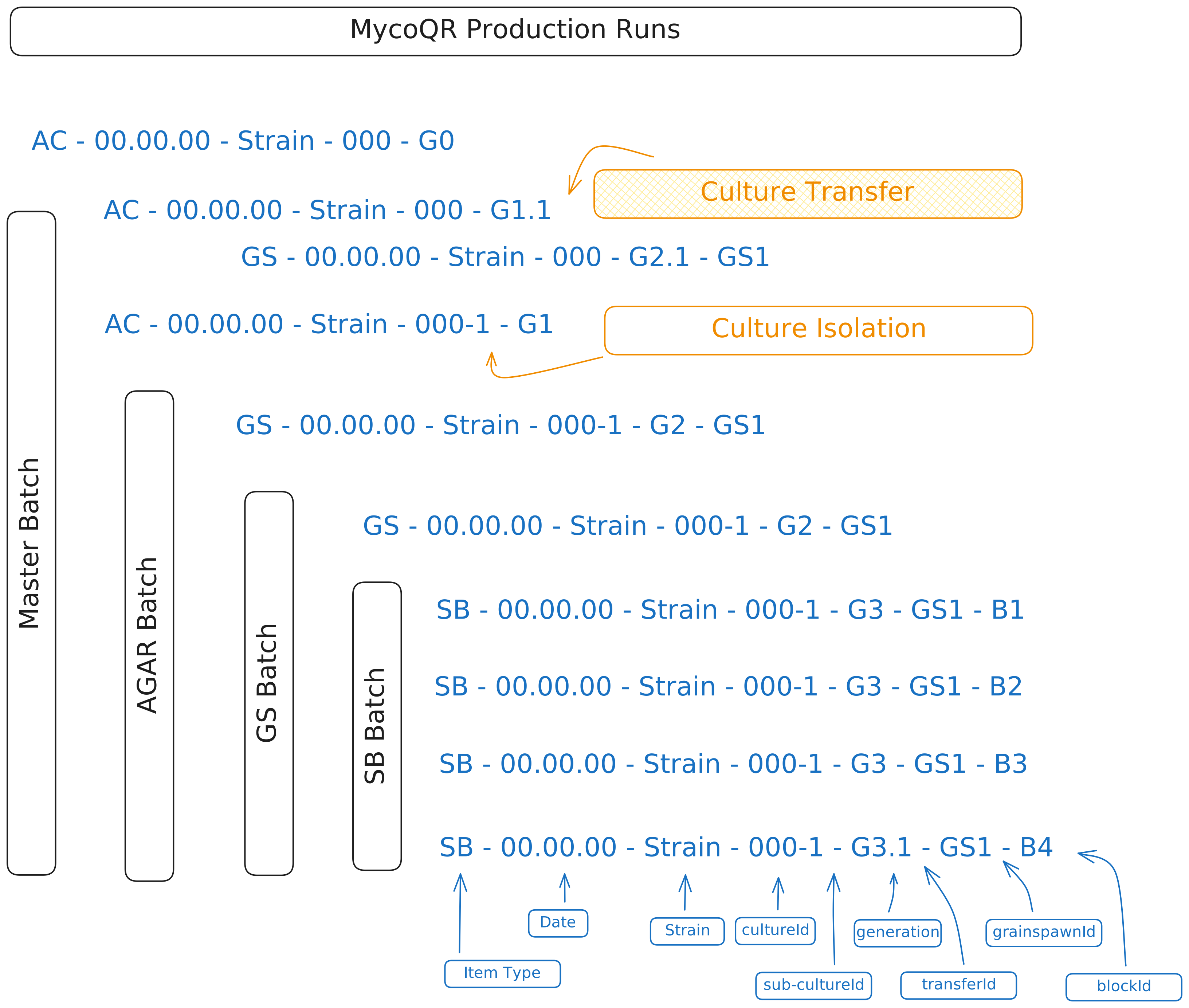
Production runs give you a clean way to analyze performance. You can compare yields between runs, see how a strain performed over different time periods, or identify which production cycles were most profitable.
Layer 3: Items (The Core of Everything)
Items are individual cultivation units—an agar culture, liquid culture, grain spawn, or substrate. Each item gets a UUID that maps to a QR code, making it scannable and trackable.
What Lives on an Item
We deliberately keep the core item record lean (16 fields) for fast querying. The essentials:
- Identity: UUID, auto-generated name, item type
- Classification: Which strain, which substrate
- State: Current stage, active status, contamination status
- Genealogy: Parent item, generation number
- Organization: Which production run, which batch, current location
Extended data—measurements, stage history, contamination records, notes—lives in related tables and loads on demand. This keeps list views fast while still capturing rich detail.
Auto-Generated Names: Making Data Readable
One of those "auto-generated" fields deserves special attention: the item name. Rather than requiring you to type names manually, MycoQR generates them automatically using a consistent format that encodes key information.
The naming format:
[TYPE] - [STRAIN] - [GENERATION] - [DATE] - [BATCH] - [NUMBER]
Each component tells you something:
| Component | Format | Example | What It Tells You |
|---|---|---|---|
| Type | AC/GS/SB/LC | GS | This is grain spawn |
| Strain | Culture ID | Blue Oyster | Which genetics |
| Generation | g# or g#.# | g2.1 | Second generation, first sibling |
| Date | YY.MM.DD | 26.01.15 | Created January 15, 2026 |
| Batch | B# | B3 | Part of batch 3 |
| Number | gs#/sb# | gs5 | Fifth grain spawn in this batch |
Real examples from a cultivation line:
AC - Blue Oyster - g0 - 25.12.15                    (Master agar culture)
AC - Blue Oyster - g1.1 - 25.12.20                  (First transfer from master)
AC - Blue Oyster - g1.2 - 25.12.20                  (Second transfer, same day)
GS - Blue Oyster - g2.1 - 25.12.30 - B1 - gs1      (First grain spawn from agar)
GS - Blue Oyster - g2.1 - 25.12.30 - B1 - gs2      (Second grain spawn, same batch)
SB - Blue Oyster - g3.1 - 26.01.10 - B2 - sb1      (First substrate from grain)
The beauty of this system: you can glance at a name and immediately know what type of item it is, which strain, how far along in the genealogy, when it was created, and which batch it belongs to. No need to open the item detail page just to understand what you're looking at.
The generation number tells you how many propagation steps away from the original culture. g0 is your master, g1 is direct children, g2 is grandchildren, and so on. The decimal (like g2.1 vs g2.3) distinguishes siblings at the same generation level.
The Item Lifecycle
Different item types move through different stages:
Every item is born at inoculation. That moment is recorded as the item's inoculation date, not as a stage, and the stages begin at Incubation:
Agar Cultures (2 stages) Incubation → Fully Colonized
Grain Spawn (4 stages) Incubation → Break & Shake → Fully Colonized → Spawn Ready
Substrates (6 stages) Incubation → Fully Colonized → Pre-Fruiting → Pinning → Fruiting → Spent Block
Each stage change gets recorded in the item's history with a timestamp, who made the change, and how (manual, QR scan, or bulk update). This creates an audit trail you can review later.
Layer 4: Batches (Grouping Siblings)
Here's where things get interesting. When you inoculate substrates from grain spawn, you're not creating one substrate—you're creating 10, 20, or even 30. Those items share the same parent and were created together.
A batch groups these siblings. It captures:
- The parent item
- The batch type (agar, grain, substrate)
- The strain and substrate used
- When it was created and by whom
Batches unlock batch-level operations: add notes to the whole batch, view statistics across siblings, or move the entire batch to a new stage at once. They also power contamination tracking—when one item in a batch shows contamination, siblings are automatically flagged as at-risk.
Genealogy: The Family Tree
Every item tracks its lineage through two numbers:
- Generation: How many parent-child steps from the original culture (0 for originals, increments with each propagation)
- Sub-generation: Position among siblings (used for naming, e.g., "g2-b3" means generation 2, third sibling)
This creates a tree structure you can traverse. From any item, you can find its parent, its children, its siblings, and trace all the way back to the original culture.
Genealogy isn't just for record-keeping. It powers contamination tracking (siblings share risk), performance analysis (do later generations perform differently?), and production planning (how many generations deep should you go before refreshing genetics?).
Layer 5: Yields (Harvest Tracking)
When substrates start fruiting, you record harvests. Each harvest is its own record: one picking, on one date, from one block, carrying the flush it belongs to. The block keeps the running totals:
- Flush 1: Date, weight, quality grade
- Flush 2: Date, weight, quality grade
- Flush 3: Date, weight, quality grade
- ...and so on
From this data, we calculate:
- Total yield weight (sum of all flushes)
- Biological efficiency = (total yield ÷ dry substrate weight) × 100
- Quality grade based on BE percentage
Yields remain connected to their source block, which connects to its batch, strain, substrate, and production run. This means you can analyze performance at any level: this specific block, this batch, this strain, or your entire operation.
Layer 6: Sellable Inventory (The Conversion Point)
At some point, cultivation items become inventory for sale. This is where the sellable items system takes over.
There are two types of sellable items:
Whole Items — Agar cultures, grain spawn, or liquid cultures you're selling directly. The original item gets marked inactive and a sellable record is created, keeping the same UUID so the QR code still works.
Yield Trays — Aggregated harvests from multiple substrates, weighed and packaged for sale. These get a new UUID since they represent a new physical thing you've created.
Sellable items track:
- Weight (expected vs. confirmed actual)
- Quality grade
- Location and expiration dates
- Status (available → reserved → sold)
- Suggested pricing (can pull from strain's price-per-gram)
Layer 7: Sales & Invoicing (Closing the Loop)
The final layer is the sales system. When you sell something, you create a sale record with:
- Auto-generated invoice number (per organization)
- Customer information (optional, but enables customer analytics)
- Line items (which sellable items, at what price)
- Payment status and method
- Delivery information
Here's where everything connects: each line item references a sellable item, which traces back to either a cultivation item or harvested yields. Those trace back to batches, production runs, strains, and substrates. The cost data from your recipes flows through to profitability calculations.
When you look at a sale, you can trace exactly where those mushrooms came from: which substrates produced them, which grain spawn colonized those substrates, which agar culture started it all, and what it cost to produce at each step.
The Complete Flow
Let's trace a real example from start to finish:
-
Setup: You configure Blue Oyster strain (BO-001) and create a Master's Mix substrate recipe costing $2.50 per block.
-
Production Run: You start "Blue Oyster - January 2026" production run.
-
Agar Culture: You create AC-001 (generation 0) from a tissue sample.
-
Grain Spawn Batch: You transfer AC-001 to 12 grain spawn, creating batch "GS-BO-001-g1" with items GS-001 through GS-012 (generation 1).
-
Substrate Batch: From GS-003, you inoculate 20 substrates, creating batch "SB-BO-001-g2" with items SB-001 through SB-020 (generation 2). Each substrate inherits the $2.50 cost.
-
Yields: Over 6 weeks, SB-007 produces three flushes totaling 1.2kg at 125% biological efficiency.
-
Sellable Inventory: You create a 5kg yield tray (YT-001) combining harvests from SB-005 through SB-010.
-
Sale: You sell YT-001 to a local restaurant for $60, creating invoice INV-0015.
-
Analysis: MycoQR can now tell you: this $60 sale came from 6 blocks costing $15 total in substrate, plus labor and overhead. Your margin, yield efficiency, and customer value are all calculated automatically.
Why This Architecture?
We designed this system with a few principles in mind:
Traceability: Every item can be traced back to its origin. This matters for quality control, contamination tracking, and customer confidence.
Cost awareness: By capturing costs at the recipe level and flowing them through items, you always know your true production costs—not estimates.
Flexibility: The batch and production run layers let you organize work however makes sense for your operation. Small hobby grows and commercial farms can both find a structure that works.
Performance: By keeping core item records lean and loading extended data on demand, the system stays fast even with thousands of items.
We hope this gives you a clearer picture of how MycoQR thinks about your data. The goal is simple: capture enough detail to be useful without creating busywork. Every field we track should answer a question you might actually ask.
Questions about our data model? Ideas for what we should track that we don't? Let us know—we're always refining based on what cultivators actually need.